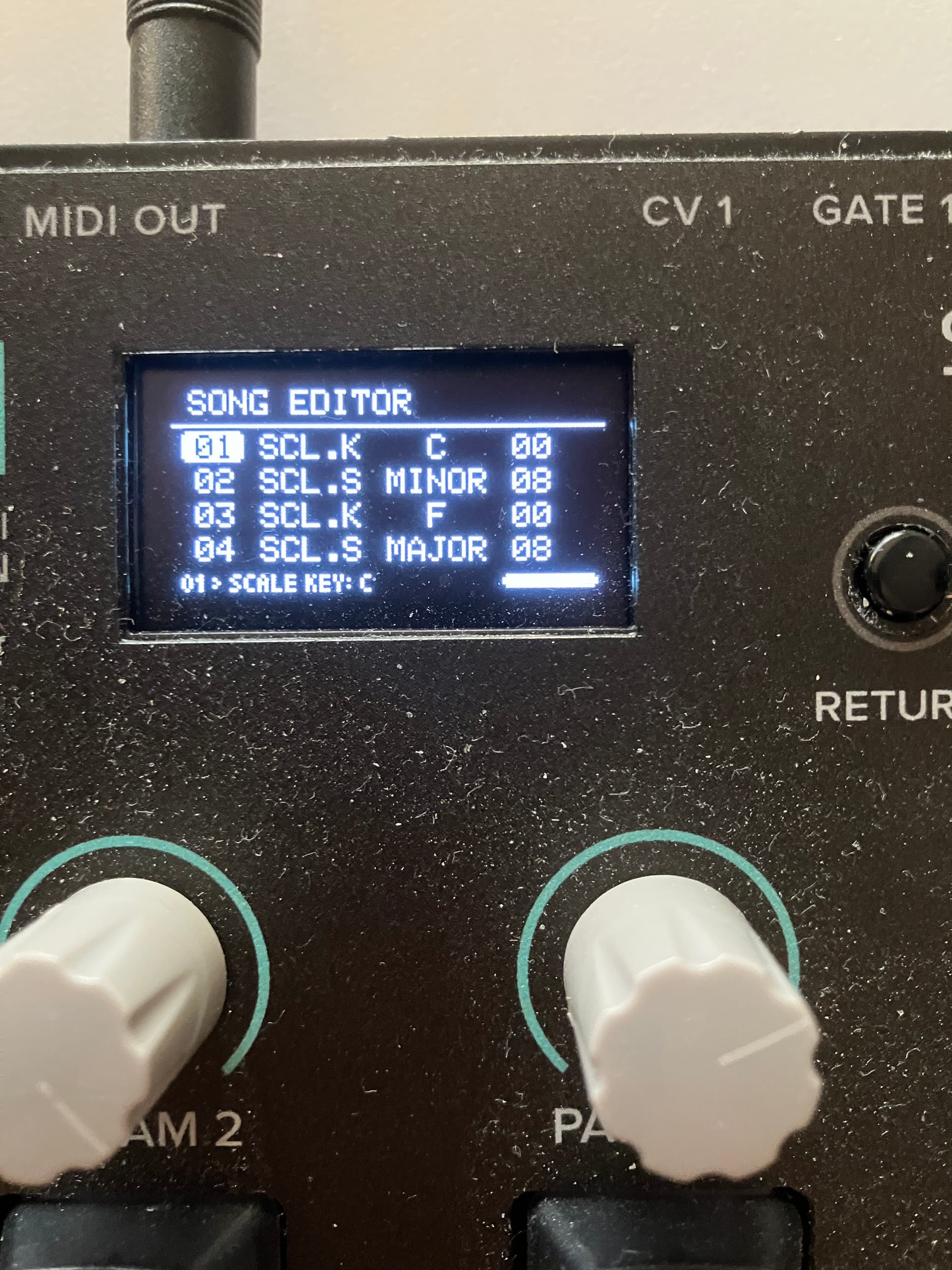
I’ve just started using 1.4 for more than testing, and I notice that every one of my saved projects’ songs come up as completely empty when I load the project. When I start with a new project and create some song info and then save, then after rebooting, I find that the song is empty. I’ve lost all my songs and my ability to save new ones.
I beg of you @IcaroFerre , this time please don’t wait for months to respond to the report of such a serious bug. When I reported the absence of MIDI clock out, you could simply have left a quick note that MIDI clock was known not working, but instead you just didn’t say anything at all for four weeks. Just one word from you would have saved a lot of work, worry, and troubleshooting of other equipment. Please start supporting your users better.
This time, the bug is even more serious. Can you acknowledge whether or not you can reproduce it? All my previous work is either lost permanently or awaiting a bug fix, and I can’t do any new work on my NGEN. This forum is not that busy. Can you start showing more consideration for your buyers?
I just tested: new project, add some song info, save project. Re-load project shows the song info. Reboot the NGEN, load the same project, song info is empty.
I tried downgrading to firmware 1.3.1. Song info in a new project saves correctly and survives reboot, but all my song information from 20 previous projects is empty.
I re-upgraded to 1.4, and saved song info is all gone after a reboot.
I was out of my office for the past week but I am back and I will focus on this issue and make it my top priority. I agree I was absent from the forum for the past couple of weeks but I will do my best to be more responsive here.
Just so I can better understand what is going on, you are able to save the project, it shows on the list after saving, but it disappears after a reboot, is that correct?
Are you saving to the internal storage or to the microSD? Does it happen with just one of the storage methods or on both?
I will look into this immediately so I can hopefully release a dedicated minor update to fix this asap.
Edit: One more question, by song info do you mean the patterns themselves (including generator / midi fx assignments) or specifically the data for the Song Mode?
I have a 1.1 (USB-C) NGEN, and I’m saving to microSD.
I am not confusing projects with projects’ Tools>Song info. Projects save and reload, without error as far as I can tell. The problem is that all projects’ Tools>Song info gets lost after a power cycle.
1.1
microSD
I save, no problem. I save projects as new, overwrite, all appear to work correctly, which means all project info gets saved—except for Song info. When I go to Tools>Song>Edit, the list of Song steps is entirely empty. With a new project that has Song info, I save and reload, and the Song info is there. But after re-booting, the Song list is empty. All my Projects that I saved with Song info months ago now load correctly (as far as I can tell), but Tools>Song>Edit shows empty for all of them.
I save, no problem. I save projects as new, overwrite, all appear to work correctly, which means all project info gets saved—except for Song info. When I go to Tools>Song>Edit, the list of Song steps is entirely empty. With a new project that has Song info, I save and reload, and the Song info is there. But after re-booting, the Song list is empty. All my Projects that I saved with Song info months ago now load correctly (as far as I can tell), but Tools>Song>Edit shows empty for all of them.
I loaded two of my oldest projects, and their Tools>Song info loaded correctly. Perhaps this Song info lossage is related to the Song’s content? In any case, one error that I’m able to reproduce every time is when the Song contains these five entries:
01 SCL.K   C   00
02 SCL.S MINOR 08
03 SCL.K   F   00
04 SCL.S MAJOR 08
05 JUMP    -   -
After the procedure shown above, my Ngen isn’t transmitting any midi notes anymore. I tried to use a new project, to save to internal memory etc. There is no midi output anymore.
Global Midi CC 20 on Channel 16 still switches on/off the “Active” switch of Midi free clock, but doesn’t start the process anymore. Midi CC Rx IS active (Midi settings)
Only Switching “Active” by pressing the Menu Button runs the sequence.
Hey @blipson and @musiclover!
Thank you so much for your additional feedback about this issue.
I was initially confused because I misunderstood the issue and thought you were having problems saving the entire project but once I realized it was specifically about Song Mode I was indeed able to confirm and reproduce the bug.
Fortunately I was able to identify the issue and fix it. The issue was that, during the 1.4 development, I tried optimizing the saving routine for the song mode but it was poorly implemented which caused it fail.
The reason for this was because song mode ends up being the section of the project that takes the longest to save due to the data size but I will need to think of a different method for this in the future (more carefully this time).
I have reverted that function to its previous state (1.3.1) which should fix it.
This does make sense to me because I have only identified that issue with the saving function itself and it should not affect loading.
I will continue to test this tomorrow to make sure the fix works and will release a 1.4.2 update to fix this issue during the week.
You’re misreading me. As I said, almost all of my projects that have saved song info from before 1.4 fail to have their song info load under 1.4. When I discovered two of my oldest projects did load their Song info, that means that those two are the anomaly. I speculated that the content of the Song info is also related to the 1.4 problem. In general, 1.4 fails to load and Song info for Projects that were saved previously to 1.4.
I have just tested saving new projects with song mode data from both 1.3 and 1.3.1 and they do seem to load correctly in 1.4.1 and in 1.4.2b1.
Could you send me a copy of one of the projects that are failing to load the song info in 1.4?
Do you think there’s a chance the projects were overwritten while in 1.4?
I have also just tested this sequence to double check and it does save and load correctly with the fix.
So far I don’t believe this specific arrangement directly caused the issues since the problem I noticed earlier affected the saving function in a more general way.
I want to email you a project. but your email refuses to deliver it, telling me it’s spam.
I also can’t attach projects to this forum because .hex is not an allowed file type. When I rename it to one of the allowed file types, the system detects that it’s not an image and prevents the upload. Perhaps allow .txt file type so that we can rename files to that for attaching to forum posts?
I can now verify that the 1.4.2 beta load my original archived projects Song info correctly, so I’ve deleted the file from this post. The beta also created a new project and saved its Song info correctly, and the Song info was correctly still there after a power cycle.
thank you very much! As far as I can see, you named the file 142, but you deployed the 1.4.2b1 (→ Info).
There is still one error left:
I send Midi CC 20 over channel 16 to the NGEN. When I turn to “1”, the Free clock turns “active" but the Midi doesn’t start. It only starts, when I “push the button” Menu, than the clock gets active AND the transport starts.
I don’t think that this is an expected behavior, because I was able to start the Midi sequence transport just by sending midi cc 20 on Channel 16 with “1”.
The running free clock, which was started with the Menu Button can be stopped by sending “0” on midi cc 20 on Channel 16. After that, sending “1” doesn’t lead to starting the sequence, only to active free clock.